
Chat & Transcript
Live output
Section titled “Live output”On chats that run on the Claude Agent SDK (Claude, OpenRouter and custom endpoints) you watch the model work instead of a spinner. Its thinking, the reply it is writing, and a tool call being prepared (with the file it targets and the size of its input so far) stream into the transcript as they are generated. Codex chats show finished entries only. When a block finishes, the live preview is replaced by the finished entry in the same frame.
The reply is typed out with a small caret rather than appearing in jumps. The text on screen is always a prefix of what the model has actually written; the pace speeds up when the model gets ahead of the caret so it never lags far behind. A word is laid out whole before it is typed, so lines do not re-wrap mid-word, and code blocks appear a block at a time rather than character by character. With your system’s reduce-motion setting on, each update is shown in full and the caret stays still.
The preview is never saved: only finished entries reach the transcript on disk.
Rich transcript rendering
Section titled “Rich transcript rendering”Tool calls render hydrated with collapsible groups. File diffs render inline. Plan-mode dialogs and interactive prompts get first-class UI with full result display.

Inline diff viewer
Section titled “Inline diff viewer”File diffs and commit diffs render directly in the transcript — no need to switch contexts.
Embedded terminal
Section titled “Embedded terminal”Per-project xterm terminal, opened as a tab in any pane. macOS and Linux only.

Split panes & tabs
Section titled “Split panes & tabs”The chat page is a pane tree you arrange yourself. Each pane holds a strip of tabs — the transcript, the changes view, and any number of terminals — and every pane can be split, resized, and closed. The arrangement is saved per project, so it is there when you come back.
Two ways to rearrange:
- Drag a tab. Drop it in the middle of a pane to move it there, or onto one of that pane’s edges to split it and place the tab in the new half.
- Use the keyboard. Focus a pane in any direction, split it, cycle its tabs, or close the active one — see Keybindings.
The app’s own pages open as tabs too: Projects, Settings, Cron, Workflows, Boards and Webhooks. That lets you keep, say, a board or the cron list in one pane while a chat runs in the next. Each page tab keeps its own address, so a particular board or settings section is still showing when you switch back to it.
Switching tabs does not tear down the one you left: terminals keep their scrollback and running process, and the transcript keeps its scroll position.
On a phone the tree collapses to a single pane that carries every tab, so nothing you arranged on a desktop becomes unreachable on a narrow screen.
Slash commands & @-mentions
Section titled “Slash commands & @-mentions”The composer offers in-place pickers for slash commands, file mentions, and subagent mentions. /clear, /compact and /cron are Kanna’s own — see Slash commands.

Plan mode
Section titled “Plan mode”The agent proposes a plan, and Kanna shows a structured approval dialog before any tool runs. Routes through Kanna’s durable approval protocol — see Security & Sandboxing.
Subagent orchestration
Section titled “Subagent orchestration”@agent/<name> is a hint to the main agent. The main agent decides whether to delegate via mcp__kanna__delegate_subagent. Runs are tracked live.

See Subagent Delegation for the full pattern.
Background tasks
Section titled “Background tasks”A task the agent launches in the background — a dev server, a long build, an async agent run — appears in the chat footer with its type, description, id, and live elapsed time.
They are more than a display. A chat with a live background task is held open: Kanna will not reap the session out from under a task that is still running, which is what used to kill long jobs silently a few minutes after they went quiet. The chat also keeps showing as running while the agent works after its turn, rather than looking idle.
Pending tool requests survive a server restart and replay on reconnect (with KANNA_MCP_TOOL_CALLBACKS=1).
Auto-resume on rate limit
Section titled “Auto-resume on rate limit”When a turn hits a rate limit, Kanna can schedule a “continue” for the moment the limit resets instead of asking you. Enable it under Settings → General; each scheduled resume is still cancellable from the chat.
The message queue
Section titled “The message queue”Everything that wants a chat’s attention arrives as a message to that chat: what you type, a cron job, a loop waking up, a background subagent reporting back, a board card starting work.
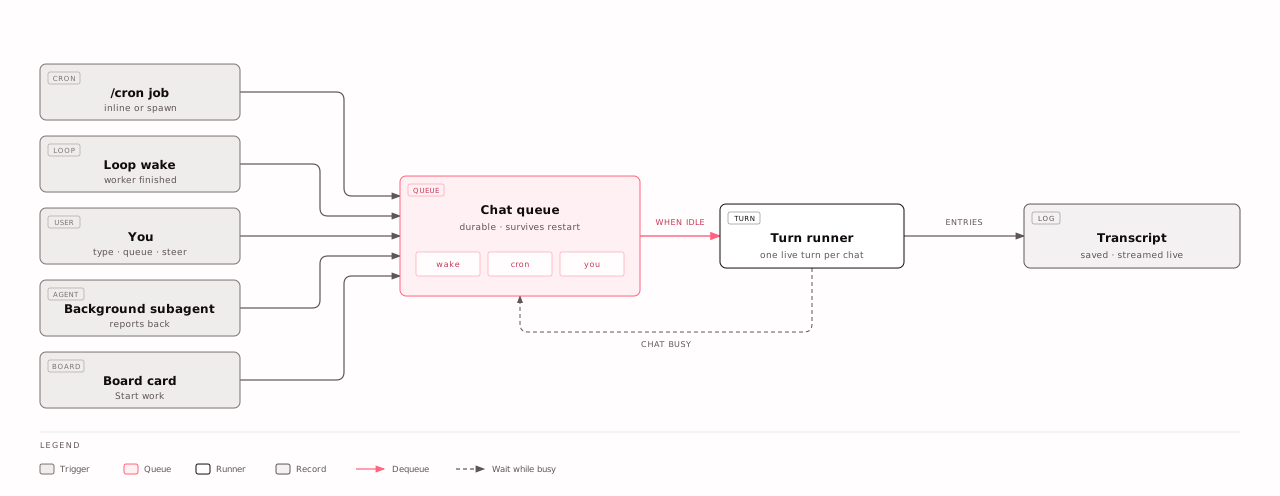
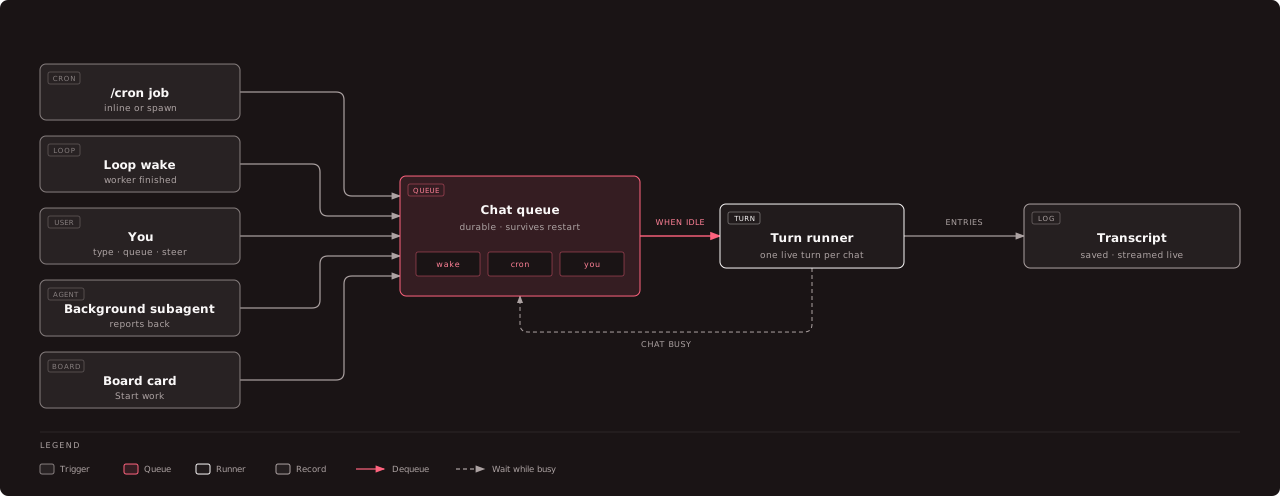
A chat runs one turn at a time. While it is busy, new messages wait in its queue and start, in order, the moment it is idle. The queue is saved to disk and a message is only removed once its turn is recorded, so a server restart does not lose one; queued messages are picked up again at boot.
A queued message can also be steered: Kanna stops the running turn and sends that message right away instead of waiting.
Context window and compaction
Section titled “Context window and compaction”The composer shows how much of the model’s context window the chat is using.
When it fills, the Claude agent compacts the conversation on its own and keeps
working; Kanna saves the summary into the transcript so a later restart resumes
with the full history. Type /compact to compact earlier, optionally saying
what to keep. See Slash commands.
File & image uploads
Section titled “File & image uploads”Drag and drop files or images into the composer to attach them to the next turn.
Uploads are resumable. A file is sent in 8 MiB pieces, so a multi-gigabyte upload works behind a Cloudflare tunnel (which refuses any single request over 100 MB) and picks up where it stopped after a dropped connection. The size limit is a setting (default 2 GB, up to 50 GB). Downloads support byte ranges, so a download manager can resume them too.