
Boards
Every project gets kanban boards, at /boards/<project>. They are ordinary
boards — columns, cards, drag and drop, a card drawer with custom fields — with
one thing that makes them more than a to-do list:
One card is one branch is one worktree is one chat.
That chain is what makes three agents working at once safe. Each has its own checkout, so they cannot touch each other’s files.
Start work
Section titled “Start work”Open a card and hit Start work. Kanna:
- Cuts a branch named after the card
- Creates a git worktree for it at
../.kanna-worktrees/<repo>/<branch> - Opens a chat rooted in that worktree
- Moves the card to the in-progress column
- Sends an opening prompt naming the card and what to do when the work is done
The worktree is a sibling of your checkout, not a directory inside it. A
nested worktree is untracked as far as the parent repo is concerned, so it would
dirty every git status — including the Changes pane and any verification your
agent runs.
It is one button, and its label carries the state rather than opening a form:
| Label | Means |
|---|---|
| Start work | Nothing exists yet — this creates the branch, worktree and chat |
| Resume | The worktree is there but the chat is gone; this makes a new one in it |
| Open chat | Both exist — jump straight to the chat |
A card on a stack board has to say which project it belongs to. A stack spans several repositories, so there is no sensible default, and Kanna declines to pick an arbitrary member — the card explains what is blocking it rather than guessing.
Columns carry meaning, not just a name
Section titled “Columns carry meaning, not just a name”A column’s behaviour comes from its semantic, never from what you called it.
There are four — start, active, review, done — and all of them are
optional. A board that marks none simply never moves cards on its own, which is
a perfectly good board; Kanna does not guess a column’s role from its title.
Only active and done actually drive anything.
Who moves the card, and when
Section titled “Who moves the card, and when”Card movement is automatic at exactly two moments, and they are deliberately not symmetric:
| Moment | Who moves it | Where to |
|---|---|---|
| You press Start work | Kanna | the active column |
| The work is finished and verified | the agent | one column forward |
The card reaches done |
only ever you | — |
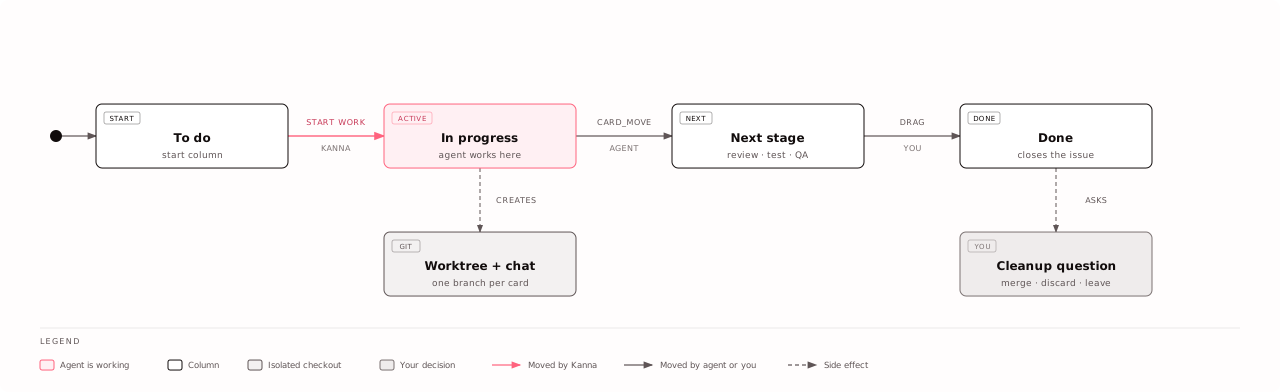
The agent moves its own card, and Kanna does not do it for them. There is no
turn-end hook, on purpose: a card takes as many turns as it takes, so “the turn
ended” is not “the work is done”. A host-side move would advance the card the
first time the agent stopped to ask you a question. Instead the opening prompt
names the card id and the destination, and asks for the move once the work is
verified — the agent calls card_move itself.
Forward means one column by order, not “jump to review.” The Dev pipeline
template runs In progress → Test → QA → Deployment; skipping to the review
column would skip a stage. One step is the only rule that fits every board.
done is unreachable that way, on purpose. Reaching it reports the item
closed to a connected tracker and raises the worktree question — merge, discard,
or leave it. Kanna asks and never decides: a column drag is one gesture with no
undo, and uncommitted work exists nowhere else. Those are your calls.
A board whose only next column is done — the GitHub issues template’s
Open / In progress / Closed — advances nothing, and the opening prompt then
says nothing about moving rather than improvising a destination.
Templates
Section titled “Templates”Four built-in templates, and you can save any board’s columns and card schema as your own:
| Template | Columns |
|---|---|
| Dev pipeline | Backlog → Todo → In progress → Test → QA → Deployment |
| Scrum | Product backlog → Sprint backlog → In progress → Review → Done |
| Bug triage | Reported → Triaged → Fixing → Verifying → Closed |
| GitHub issues | Open → In progress → Closed |
Each brings its own card fields — Bug triage adds Severity and Reproduces, for instance — and columns can carry a WIP limit.
Card fields
Section titled “Card fields”A board defines its own card schema: description, priority, assignee, labels, external URL, and any select or text fields you add. Edit it from the board’s card-schema panel; existing cards keep the values they have.
GitHub Issues sync
Section titled “GitHub Issues sync”A board can be bound to an issue tracker and kept in step with it. The mapping is deliberately small, because it is the only part every tracker agrees on:
| Remote | Card |
|---|---|
| title | the card title |
| body | the description field |
| labels | the labels field |
| assignee | the assignee field |
| state | which column the card is in |
State is the interesting one. Open/closed is the only status every tracker has,
and your columns are your own, so it maps through the column semantics —
start for open, done for closed. A board that marks neither does not move
cards between columns at all.
Agent writes are held back
Section titled “Agent writes are held back”Every board change records who made it. A change made by an agent is held
rather than pushed to the tracker, marked agent_push_disabled, unless you
explicitly allowed agent pushes on that binding.
An agent advancing its own card must not silently close a real issue in your tracker. Held changes are visible in the sync panel, so you can review and release them.
What the agent can do
Section titled “What the agent can do”Agents get five board tools, available in chats that belong to a project with boards:
| Tool | Does |
|---|---|
board_list |
Lists the project’s boards |
board_get |
Reads a board: columns, per-column card counts, and the first 20 cards |
card_create |
Adds a card |
card_move |
Moves a card to another column |
card_comment |
Comments on a card — what it did, what it found, why it moved it |
Two limits are worth knowing about, because they are what keeps the feature usable rather than defensive trimming:
board_getnever returns a whole board. It returns counts plus a 20-card window. A board imported from a 5,000-issue tracker would otherwise consume an entire turn’s context in one call.- Every id is resolved against the chat’s own project before any write, so an agent cannot reach another project’s board by guessing an id.
Stack boards
Section titled “Stack boards”A multi-repo stack gets its own boards too, at
/boards/stack/<stack> — for work that spans several repositories rather than
sitting in one. As above, a stack card must name the project it will be worked
in before it can start.